

Description
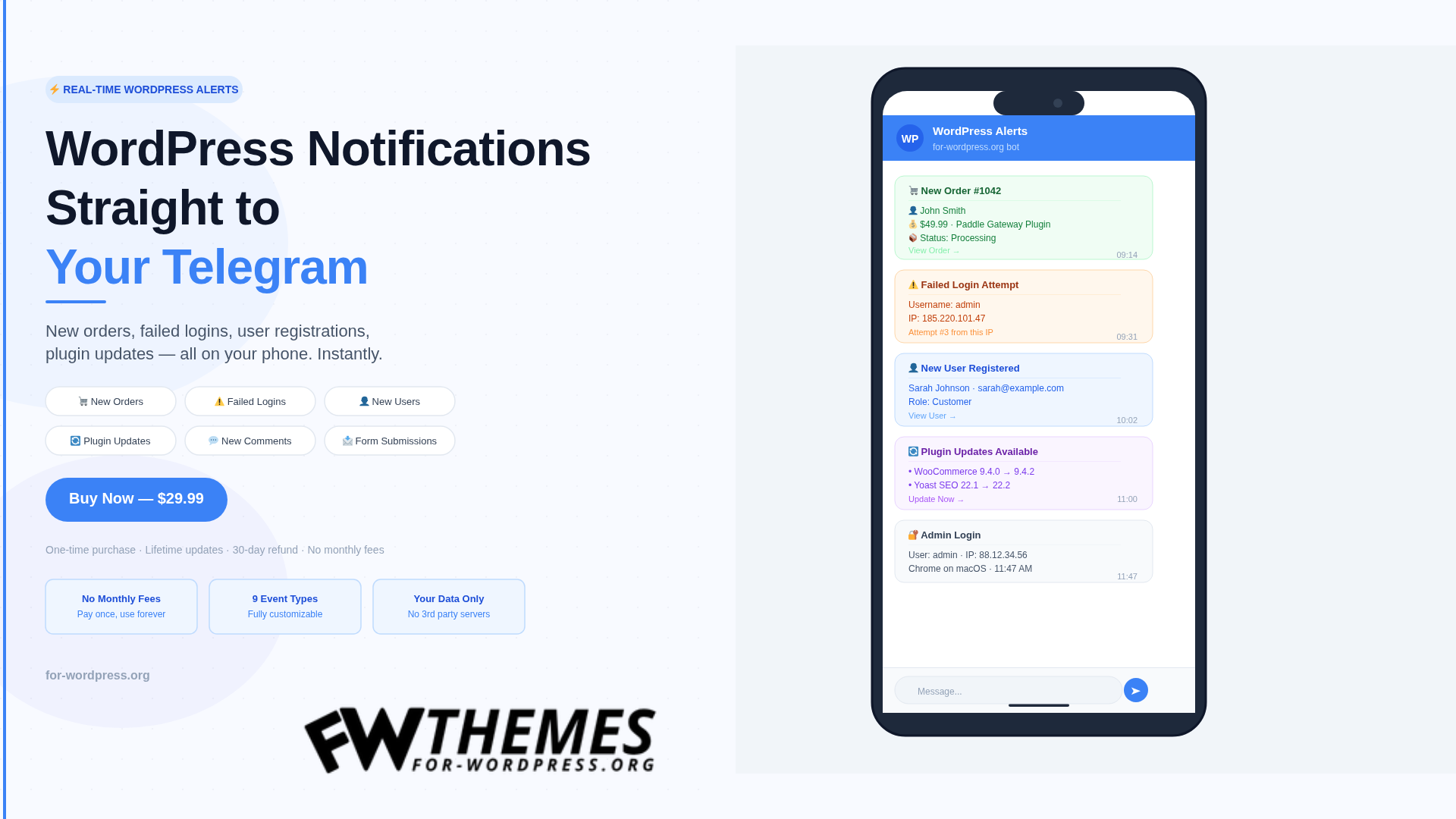
Most WordPress site owners find out about important events too late — an order failed, someone tried to brute-force the login, a plugin update has been sitting there for two weeks. Email notifications get buried. Dashboard checks are easy to forget.
WP Telegram Notifications Pro fixes this. The moment something happens on your WordPress site, you get a Telegram message. On your phone. Instantly.
How It Works
Connect the plugin to a Telegram bot (takes 2 minutes via @BotFather), enter your Chat ID, and choose which events you want to be notified about. That’s it. From that point on, your WordPress site sends real-time alerts directly to Telegram — no third-party servers, no data leaving your control.
What Triggers a Notification
Every notification type can be individually enabled or disabled with a custom message template:
New WooCommerce order — customer name, email, items, total, and a direct link to the order. Set a minimum order amount to avoid noise from small test orders.
Order status change — get notified when an order moves to Completed, Refunded, or any status you choose.
New user registration — name, email, role, and registration time. Never miss a new customer.
Failed login attempt — IP address, attempted username, and attempt count. Know when someone is trying to get in.
Admin login — who logged in, from which IP, and at what time. Useful for shared site management.
New comment — author, excerpt, and the post it was left on. Stay on top of engagement and spam.
New post published — title, author, categories, and a link. Track content published by your team.
Plugin updates available — a daily digest of which plugins have pending updates. Stop letting your site run on outdated code.
Contact Form 7 submission — form name, sender, and message excerpt. Never miss a lead.
Built for Real Control
Quiet Hours — set a time window (like 22:00 to 08:00) when notifications are held and delivered at the start of your active period. No 3am pings.
Rate Limiting — cap notifications to prevent floods during traffic spikes or bot attacks.
Multiple Recipients — enter multiple Chat IDs separated by commas. Send to personal chats, groups, or Telegram channels. Your entire team can stay informed.
Custom Message Templates — every notification has an editable template. Add or remove fields, change the format, adjust the tone.
Notification Log — a full history of every notification sent, failed, or queued. See exactly what was delivered and when.
Test Mode — log notifications without sending them. Useful for testing template changes without spamming your Telegram.
No Monthly Fees. Ever.
Every live chat and notification tool in this space charges monthly. Telegram bots are free. WordPress hooks are free. The only thing you pay for is the plugin — once.
One license. One site. Lifetime updates included.
Requirements
WordPress 6.0 or higher. PHP 8.0 or higher. A free Telegram account. WooCommerce required only for order notifications. Contact Form 7 required only for CF7 notifications.
FAQ
Do I need a Telegram account? Yes. You also need a Telegram bot, created for free via @BotFather in about 2 minutes. The plugin walks you through it.
Can I notify multiple people? Yes. Add multiple Chat IDs separated by commas in the settings. Works with personal chats, groups, and channels.
Does it slow my site down? No. Notifications are sent asynchronously and have no impact on frontend performance.
What if a notification fails to send? Failed notifications are logged. You can see what happened and why in the Notification Log tab.
Is my bot token secure? Yes. The bot token is encrypted before being stored in the database using AES-256-CBC with your WordPress secret key.
What if it does not work for me? 30-day money-back guarantee. Email us and we refund in full, no questions asked.
Marcus –
I run a WooCommerce store with about 25-30 orders a day, and before this plugin I was constantly refreshing my email to check on new orders. Now everything lands in my Telegram instantly — new orders, failed payments, even low stock alerts. The setup took maybe 5 minutes. Honestly one of those plugins that makes you wonder how you survived without it.
Sarah Lindqvist –
What sold me on this was the failed login notifications. I manage 6 WordPress sites for clients, and getting a Telegram ping whenever someone tries to brute-force a login is invaluable. I tried two other notification plugins before and both required a monthly subscription for what this does with a one-time payment. Great value.
David Okafor –
Works well for what it does. I set it up on a membership site and I get notified when someone registers, when a payment fails, and when plugins need updates. The only reason I’m giving 4 stars instead of 5 is that I’d love to see support for custom post type notifications — but for the standard WordPress events, it covers everything.
Elene Petrova –
I was looking for something exactly like this. My client wanted real-time alerts for form submissions and new orders without paying for Slack or some SaaS dashboard. This plugin sends everything to a Telegram group I share with the client. They love it, I look like a genius. No recurring fees is the cherry on top.
James Callahan –
Finally replaced three different plugins with just this one. I was using separate solutions for order notifications, security alerts, and update reminders. Now it’s all in one Telegram bot. The plugin update notifications alone have saved me twice — caught a critical security update within minutes of release. Very solid plugin.
Aisha Nguyen –
Bought this for my small e-commerce site. Setup was straightforward — create a bot on Telegram, paste the token, done. I get instant pings for every new order. The notification messages are clean and well-formatted, not just a wall of raw data. Would be nice to customize the message templates a bit more, but overall very happy with it.
Robert Engström –
My wp_options table had grown to 14MB of autoloaded data after years of installing and removing plugins. Ran the Autoload Inspector and it immediately flagged 8MB of orphaned junk from plugins I deleted ages ago. After cleanup, my TTFB dropped from 1.8s to 0.6s. This bundle paid for itself in the first five minutes.