

Description
Your WordPress database has a problem you cannot see. Every plugin you install adds data to wp_options with autoload turned on. Every plugin you delete leaves orphaned tables, options, cron jobs, and meta records behind. Over time, this invisible bloat crosses the critical threshold — and your site gets slower for no obvious reason.
WP Database Optimizer Bundle gives you two focused plugins that work together to solve both sides of this problem.
Plugin 1: Autoload Inspector
Every page load on your WordPress site reads the entire wp_options autoload dataset from the database. When that dataset crosses 1 MB, you hit Memcached limits, TTFB increases, and every single page request becomes slower — even cached ones.
Autoload Inspector is the first plugin built to solve this specific problem with surgical precision.
Health Dashboard
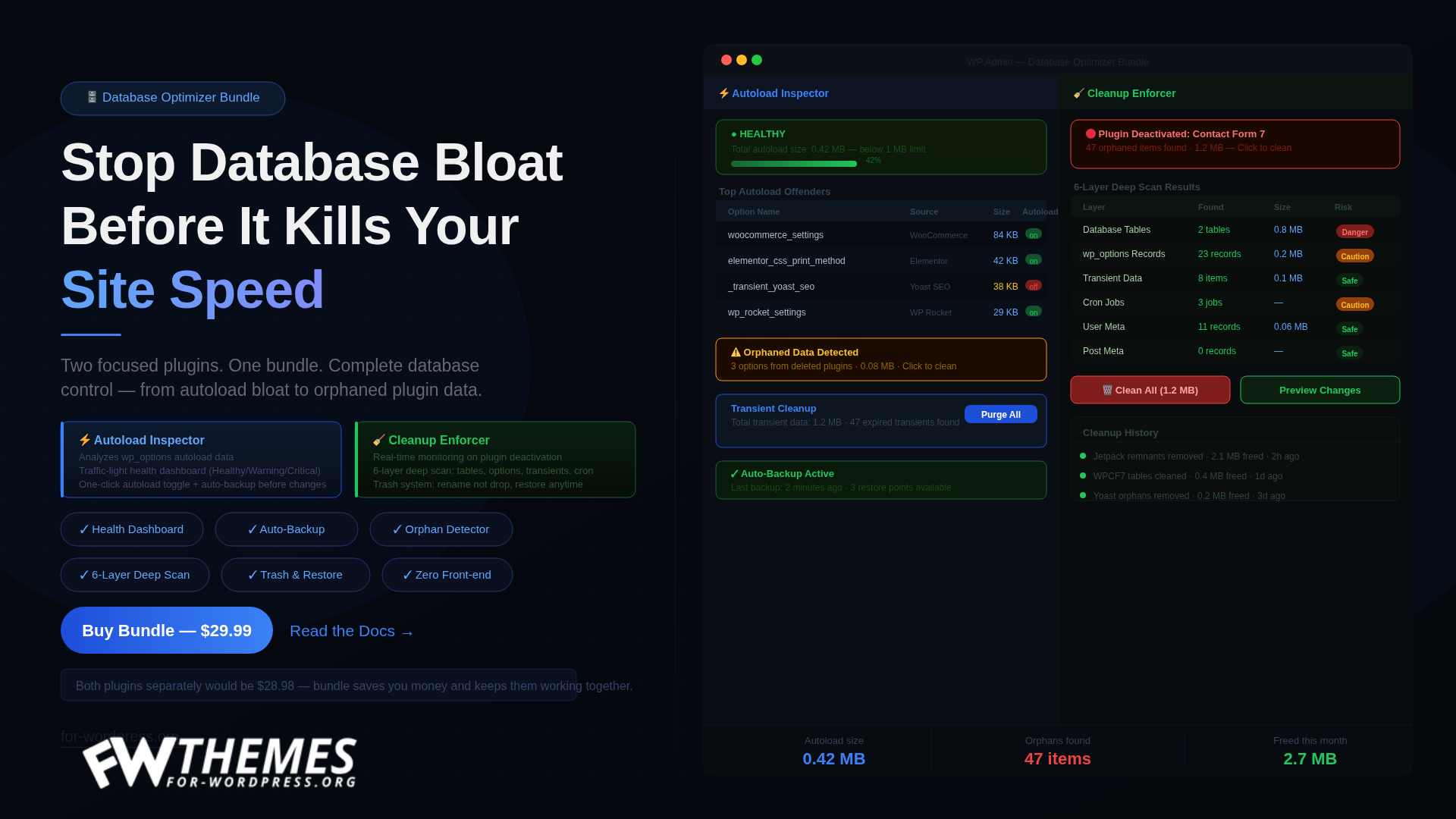
Real-time traffic-light status: Healthy, Warning, or Critical based on your total autoload size. Visual progress bar showing exactly how close you are to the 1 MB safety limit. Real-time size calculation updated as you make changes.
Top Offenders View
See the 10 options consuming the most autoload memory. Automatic source detection identifies which plugin owns each option — supports 30+ popular plugins including WooCommerce, Elementor, Yoast, Jetpack, Wordfence, and Rank Math. Full compatibility with WordPress 6.6+ autoload values.
Data Management
Browse all autoloaded data with search, sort, and pagination. One-click autoload toggle — disable autoload for any option without deleting it. Orphaned data detection finds leftover data from plugins you have already removed. Bulk select and clean orphaned records with a single click.
Safety and Backup
Every change is automatically backed up before execution. One-click restore from the Backups tab — undo any change instantly. WordPress core options are permanently protected and cannot be modified. All operations use nonce verification and capability checks.
Transient Cleanup
Shows total transient data size at a glance. Detects expired transients with one-click purge. Paired timeout and value deletion for complete cleanup.
Plugin 2: Cleanup Enforcer
WordPress has a dirty secret: when you delete a plugin, its data stays behind. Orphaned database tables, autoloaded options, transient caches, scheduled cron jobs, and user and post meta records — all silently bloating your database and slowing your site.
Cleanup Enforcer monitors your plugin lifecycle and alerts you the moment orphaned data is detected.
Real-Time Monitoring
Automatic scan triggers the moment any plugin is deactivated. Instant admin notice: “Plugin X left 47 orphaned items (1.2 MB) — click to clean.” Post-deletion scanning catches leftovers even after full removal. Snapshot system saves database state before each deactivation for comparison.
6-Layer Deep Scanning
Database tables — finds plugin-created tables that no active plugin owns. wp_options records — detects orphaned settings and configuration data. Transient data — identifies cached data from removed plugins. Cron jobs — finds scheduled tasks that will never run again. User meta — detects per-user settings left by uninstalled plugins. Post meta — finds custom field data attached to posts from deleted plugins.
Smart Plugin Recognition
50+ built-in plugin-to-prefix mappings including WooCommerce, Elementor, Yoast, Jetpack, Wordfence, and Rank Math. Cross-references active plugin list to prevent false positives. “Possible Owner” column shows which deleted plugin likely created each orphan.
Safety-First Architecture
Three-level safety system: Safe (green), Caution (yellow), Danger (red). Active plugin tables are automatically protected — delete button is disabled with a clear warning. Trash system: tables are renamed, not dropped — restore anytime from the Trash tab. WordPress core tables are permanently protected. All cleanup actions are logged with timestamps in the History tab.
Deep Scan Mode
Scans every non-core table in your database. Identifies tables not belonging to any installed plugin. Shows row count, table size, and possible owner for each orphan. Perfect for sites that have been running for years with dozens of plugin changes.
What You Get
Both plugins — Autoload Inspector and Cleanup Enforcer. Lifetime license for 1 site. All future updates included. Priority email support. 30-day money-back guarantee.
Requirements
WordPress 5.8 or higher. PHP 7.4 or higher. Works with any WordPress site — WooCommerce not required.
FAQ
Do I need both plugins or can I buy separately? The bundle gives you both at a better price. Autoload Inspector handles active plugin bloat in wp_options. Cleanup Enforcer handles orphaned data from deleted plugins. Together they cover the full database lifecycle.
Is this safe to use on a live site? Yes. Both plugins back up every change before executing it. You can restore any action with one click. WordPress core tables are permanently protected and cannot be touched.
Will this slow down my site? Zero frontend impact. Both plugins load their assets only on their own admin pages. Your visitors never load a single byte from either plugin.
What if it doesn’t work for me? 30-day money-back guarantee. Email us and we refund in full.

Patrick J. –
There’s no need to install bloated plugins for this process; this bundle, with its one-time price, saved me from annual and monthly costs, and also made the job simpler and more optimized. I recommend it.
Priya Sharma –
The Cleanup Enforcer is brilliant. I never realized how much garbage deleted plugins leave behind — orphaned tables, leftover cron jobs, transients that never expire. This found 23 orphaned database tables on one of my client sites. The visual breakdown makes it easy to understand what each entry is and whether it’s safe to remove. Must-have for anyone managing multiple WordPress sites.
Thomas Bakker –
Good bundle. The Autoload Inspector gives you a clear picture of what’s bloating your options table. I was able to reduce autoloaded data from 9MB to under 2MB on a site that was loading painfully slow. Cleanup Enforcer caught leftover tables from WooCommerce plugins I removed months ago. Taking one star off only because I wish there was a scheduled auto-cleanup option.
Michelle Torres –
I’m a freelance developer and database bloat is something I deal with on almost every client handoff. This bundle has become part of my standard toolkit. The Autoload Inspector especially — clients install 40 plugins, delete 30 of them, and wonder why their site is slow. Now I just run the scan and show them exactly what’s wrong. Professional and effective.
Kevin Walsh –
Tried WP-Optimize and Advanced Database Cleaner before this. Neither of them caught the autoload bloat the way this plugin does. The difference is that this actually shows you which plugin left which data behind, so you’re not blindly deleting rows. Cleaned up a site that had 47 orphaned tables. Load time went from 4.2s to 1.9s. Absolutely worth the price.