

If you run a WordPress or WooCommerce store, you have probably looked
at live chat tools and walked away shocked at the pricing.
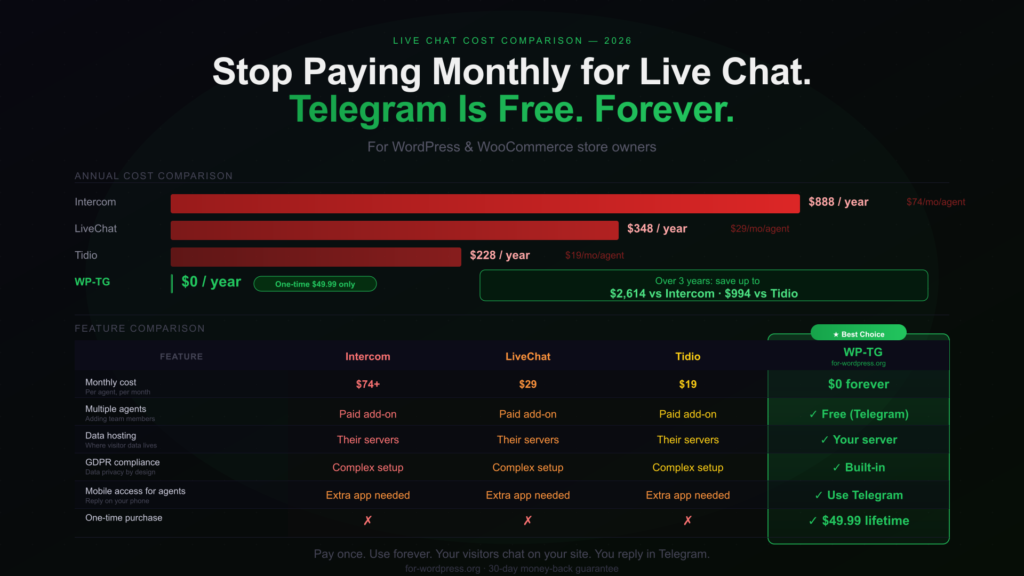
LiveChat charges $29 per agent per month. Intercom starts at $74.
Tidio’s paid plan sits at $19. For a small store or solo developer,
that is $228 to $888 per year — just to talk to your customers.
There is a better way. And it costs nothing to run.
The Problem With Traditional Live Chat Tools
Most live chat platforms follow the same model: monthly subscription,
per-agent pricing, and your visitor data hosted on their servers.
The problems stack up quickly:
- One agent on LiveChat = $348/year. Two agents = $696/year.
- You do not own your data. Every conversation lives on their servers.
- GDPR compliance becomes your headache, not theirs.
- If you stop paying, the chat widget goes dark immediately.
For a store doing $1,000/month in revenue, spending $300-900/year on
live chat is a significant operating cost — especially when there is a
free alternative sitting on your phone already.
The Alternative: Telegram
Telegram is free. Its Bot API is free. Its Forum Topics feature — which
lets you organize group conversations into separate threads — is free.
This is exactly what makes it a perfect support backend for WordPress.
Here is the concept: your WordPress site shows a professional chat widget
to visitors. When someone sends a message, instead of routing it to a
paid dashboard, it goes directly to your Telegram group — where your
support team already is.
No new app to learn. No new dashboard to check. Just Telegram, which
you already have on your phone.
How WP-TG Live Support Chat Works
WP-TG Live Support Chat Plugin
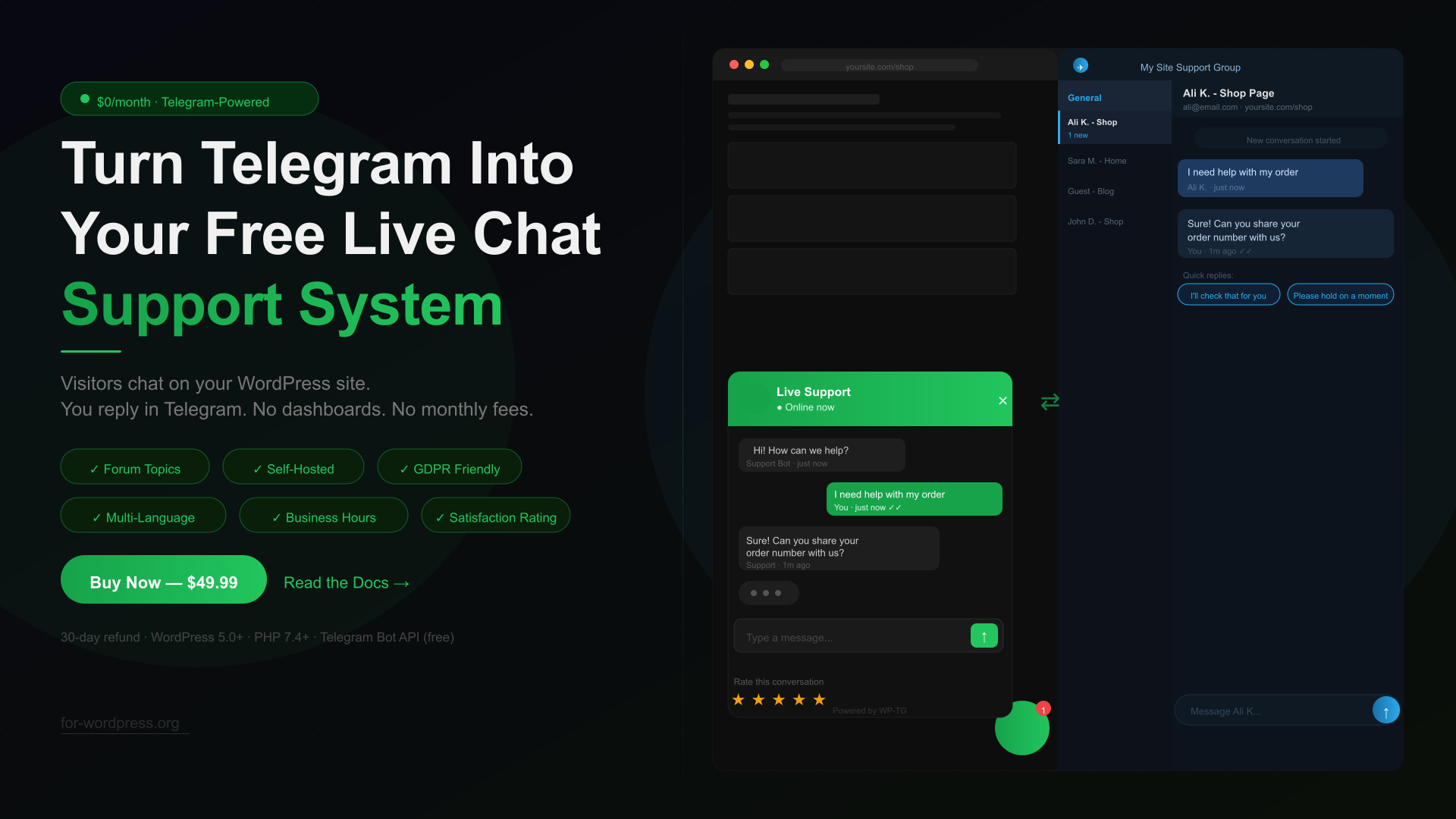
WP-TG is a WordPress plugin that connects your site’s chat widget
directly to a Telegram Supergroup using Forum Topics.
The flow looks like this:
- A visitor opens the chat widget on your site
- They fill in their name, email, and first message
- The plugin automatically creates a dedicated Forum Topic in your
Telegram group — one topic per visitor, no message mixing - You reply directly in Telegram from your phone or desktop
- Your reply appears instantly in the visitor’s chat widget on the site
That is the entire system. Your visitor sees a polished chat experience.
You see a Telegram message. The whole thing costs zero per month to run.
What You Get That Paid Tools Don’t Offer
Full data ownership. Every message stays on your WordPress server.
Nothing is sent to a third-party platform. This makes GDPR compliance
straightforward — you control everything.
Multiple agents at no extra cost. Add your entire support team to
the Telegram group. Anyone can reply to any visitor topic. With
Intercom or LiveChat, each additional agent means another monthly charge.
Reply from any device. Telegram works on iPhone, Android, Windows,
Mac, and web. Your agents do not need to install anything new — they
already have Telegram.
Business hours and offline handling. Set your support hours in the
plugin. Outside of those hours, visitors see an offline message, and
their message is saved with an email notification sent to you.
The Real Cost Comparison
Over three years, the math becomes impossible to ignore:
| Monthly | Per Year | Over 3 Years | |
|---|---|---|---|
| Intercom | $74+ | $888+ | $2,664+ |
| LiveChat | $29 | $348 | $1,044 |
| Tidio | $19 | $228 | $684 |
| WP-TG | $0 | $0 | $0 |
WP-TG is a one-time purchase of $49.99. That is it.
No renewals. No per-agent fees. No data leaving your server.
Compared to Tidio over three years, you save $634.
Compared to Intercom, you save over $2,600.
WP-TG Live Support Chat Plugin
How to Set It Up (15 Minutes)
Step 1: Create a Telegram Bot
Open Telegram, search for @BotFather, send /newbot, and follow the
prompts. You get a Bot Token that looks like: 7123456789:AAF…
Step 2: Create a Telegram Supergroup
Create a new Telegram group. Go to Group Settings → Topics → Enable
Topics. Add your bot as Admin with Manage Topics permission.
Step 3: Get Your Group ID
Temporarily add @userinfobot to your group. It posts the Chat ID
(looks like -1001234567890). Remove it after.
Step 4: Install and Connect
Upload the plugin .zip to WP Admin → Plugins → Add New.
Go to WP-TG Settings, paste your Bot Token and Group ID,
click Register Webhook. Done.
Who This Is For
WP-TG makes sense if you:
- Sell digital products, themes, plugins, courses, or software
- Want live chat without recurring monthly costs
- Already use Telegram or are open to using it
- Care about data privacy and GDPR compliance
- Run a small team where multiple agents share support duties
It is not the right fit if you need advanced CRM features, complex
automation workflows, or deep integration with tools like HubSpot or
Salesforce. For a straightforward support chat on a WordPress site,
it covers everything you need.
The Bottom Line
Live chat does not have to cost $200-900 per year. Telegram’s Bot API
is free, powerful, and already on your phone. WP-TG connects it to
your WordPress site with a clean visitor-facing widget and zero monthly
overhead.
One purchase. Zero monthly fees. Your data on your server.
Get WP-TG Live Support Chat — $49.99 WPTG LIVECHAT
Read the full documentation