


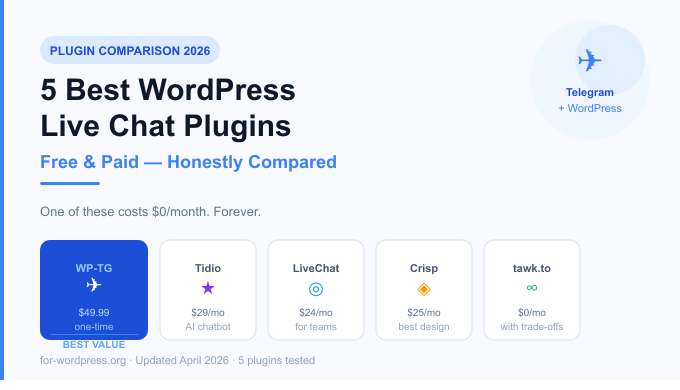
Live chat is no longer optional. Visitors who can ask a quick question are 3x more likely to convert than those who can’t. But here’s the problem most WordPress site owners run into: every decent live chat solution costs money. A lot of it.
Tidio starts at $29/month. LiveChat is $24/month per agent. Intercom? Don’t even ask. If you run a small business, a personal project, or a plugin marketplace, these numbers add up fast — $300 to $800 per year just to answer customer questions in real time.
We tested and compared 5 of the most popular WordPress live chat plugins in 2026. We looked at pricing, ease of setup, mobile support, features, and one thing most reviews ignore: what happens to your data and your customers when the company raises prices or shuts down.
One of these plugins costs nothing. Not a free trial. Not a freemium tier. Nothing — ever. Let’s get into it.
What Makes a Good WordPress Live Chat Plugin?
Before diving in, here’s our evaluation criteria:
- Price — total cost of ownership, including monthly fees
- Setup time — how long from install to first message
- Mobile support — can you reply from your phone?
- Notifications — do you actually know when someone messages?
- Data ownership — who owns the conversation data?
- Performance — does it slow your site down?
- No vendor lock-in — what happens if you cancel?
1. WP-TG Live Support Chat — Best Free Option (No Monthly Fees)
Price: $49.99 one-time (free to try with limited features)
Best for: Developers, freelancers, small businesses, anyone who hates monthly fees
WP-TG takes a completely different approach from every other plugin on this list. Instead of routing your chat through a third-party server, it connects your WordPress site directly to Telegram — an app you probably already have on your phone.
When a visitor sends a message from your site, you get a Telegram notification instantly. You reply in Telegram. The visitor sees your reply on your website. No new app to learn, no new dashboard to check, no new tab to keep open.
How it works:
- Install the plugin
- Create a Telegram bot (takes 2 minutes with BotFather)
- Connect the bot to your WordPress site
- Done — you’re live
What we liked:
- Zero monthly cost — you pay once, use forever
- Instant notifications on your phone via Telegram
- Works on any device Telegram runs on (iOS, Android, desktop, web)
- No third-party servers — conversations go directly between visitor and Telegram
- GDPR-friendly — no data stored on external servers
- Lightweight — adds less than 15KB to your page
What could be better:
- Requires a Telegram account (most users already have one)
- No built-in chat history dashboard in WordPress admin
- No AI chatbot or automated responses (yet)
Who should use it: Anyone who wants professional live chat without a monthly bill. Perfect for WordPress plugin developers, theme shops, freelancers, and small agencies.
2. Tidio — Best All-in-One Solution
Price: Free tier available. Paid from $29/month
Best for: eCommerce stores that want automation and AI
Tidio is one of the most popular live chat plugins in the WordPress ecosystem, and for good reason. The interface is polished, setup is straightforward, and the free tier is genuinely usable for small sites.
The standout feature is Tidio AI (Lyro) — an AI-powered chatbot that can answer common questions automatically. If you get a lot of repetitive questions about shipping, returns, or product specs, Lyro can handle them without you lifting a finger.
What we liked:
- Clean, professional chat widget design
- AI chatbot (Lyro) handles repetitive questions
- Good free tier for low-volume sites
- Email marketing integration
What could be better:
- Price jumps sharply as you scale ($29/month becomes $59, $99 quickly)
- AI features are locked behind higher tiers
- Your conversation data lives on Tidio’s servers
Who should use it: Growing eCommerce stores that need automation and can justify a monthly cost.
3. LiveChat — Best for Teams
Price: From $24/month per agent
Best for: Mid-size businesses with dedicated support staff
LiveChat is the enterprise standard. It’s polished, reliable, and packed with features — ticket management, team routing, canned responses, analytics. If you have a support team of 3+ people handling hundreds of chats per day, LiveChat is built for that.
What we liked:
- Excellent team features (routing, assignment, supervision)
- Very detailed analytics and reporting
- 200+ integrations (Salesforce, HubSpot, etc.)
- Reliable uptime and performance
What could be better:
- $24/month per agent adds up fast for teams
- Overkill for solo operators and small businesses
- No meaningful free tier
Who should use it: Businesses with dedicated support teams who treat live chat as a core business function.
4. Crisp — Best Design and UX
Price: Free tier available. Paid from $25/month per workspace
Best for: Startups and SaaS companies
Crisp has the most beautiful chat widget of any tool on this list. The interface is minimal, modern, and highly customizable. Beyond live chat, Crisp includes a knowledge base, chatbot builder, and email campaigns — positioning itself as a full customer communication platform.
What we liked:
- Stunning widget design that doesn’t look like a plugin
- Free tier includes unlimited seats (just limited history)
- Built-in knowledge base
- Good mobile app
What could be better:
- Free tier limits message history to 30 days
- Advanced features require the higher ($95/month) tier
- Can feel bloated if you just want live chat
Who should use it: Design-conscious startups and SaaS companies who want a complete customer communication platform.
5. tawk.to — Best Truly Free Option (With Trade-offs)
Price: Free (supported by optional paid “remove branding” add-on)
Best for: Budget-conscious sites that can tolerate the trade-offs
tawk.to is completely free — forever. They make money by offering paid “remove branding” and hired-agent services. For many small sites, this is appealing.
What we liked:
- Genuinely free, no credit card required
- Unlimited agents and chat volume
- Decent mobile app
- Large user base, well-documented
What could be better:
- “Powered by tawk.to” branding on widget (paid to remove)
- Your conversation data lives on their servers permanently
- Performance can be slower than self-hosted alternatives
- Business model depends on selling your customers’ attention
Who should use it: Sites with very tight budgets that don’t mind the branding and data trade-offs.
Side-by-Side Comparison
| Feature | WP-TG | Tidio | LiveChat | Crisp | tawk.to |
|---|---|---|---|---|---|
| Starting Price | $49.99 one-time | $29/month | $24/month/agent | $25/month | Free |
| Year 1 Cost | $49.99 | $348+ | $288+/agent | $300+ | $0 |
| Year 3 Cost | $49.99 | $1,044+ | $864+/agent | $900+ | $0 |
| Mobile Notifications | Telegram (instant) | App | App | App | App |
| No Monthly Fee | ✅ | ❌ | ❌ | ❌ | ✅ |
| Data on Your Terms | ✅ | ❌ | ❌ | ❌ | ❌ |
| AI Chatbot | ❌ | ✅ (paid) | ✅ (paid) | ✅ (paid) | ❌ |
| Team Features | ❌ | ✅ | ✅ | ✅ | ✅ |
| Setup Time | ~5 minutes | ~10 minutes | ~15 minutes | ~10 minutes | ~10 minutes |
| Performance Impact | Very low | Medium | Medium | Medium | Medium |
| GDPR Friendly | ✅ | Partial | Partial | Partial | Partial |
| Free Trial | ✅ | ✅ | ✅ | ✅ | N/A |
The Real Cost of “Free” Monthly Plans
Here’s something most comparison articles don’t show you: the true 3-year cost of monthly live chat tools.
If you pay $29/month for Tidio’s basic plan:
- Year 1: $348
- Year 2: $348
- Year 3: $348
- Total after 3 years: $1,044
For that same $1,044, you could buy WP-TG 20 times over — and still have $1,000 left.
For solo developers, freelancers, and small businesses, the math is simple. Monthly subscriptions are investments that pay off at scale. If you’re handling 50 chats per day across a team of 10 agents, LiveChat at $24/month is a bargain. If you’re a WordPress plugin developer answering 5 questions per week, it’s highway robbery.
Which Plugin Should You Choose?
Choose WP-TG if: You want professional live chat without a monthly bill, you already use Telegram (or are willing to), and you value data privacy. Perfect for freelancers, developers, and small businesses.
Choose Tidio if: You run an eCommerce store, want AI automation, and have budget for monthly fees.
Choose LiveChat if: You have a dedicated support team and need enterprise-grade team management features.
Choose Crisp if: Design matters to you and you want a full customer communication platform beyond just chat.
Choose tawk.to if: Your budget is genuinely zero and you can live with the branding and data trade-offs.
Final Verdict
After testing all five, our recommendation depends entirely on your situation. But if we had to pick one plugin for the typical WordPress site owner — a developer, freelancer, or small business running a lean operation — it’s WP-TG.
The reason is simple: it works, it’s instant, you already have Telegram on your phone, and you pay for it exactly once.
The monthly fee model made sense when software was expensive to host and maintain. In 2026, paying $348 per year to route chat messages through someone else’s server is hard to justify when a one-time alternative works just as well for 90% of use cases.
Try WP-TG for Free
WP-TG Live Support Chat is available at for-wordpress.org. The plugin includes a demo site where you can test the experience before buying.
- Demo
- Product page
- Price: $49.99 — one-time purchase, lifetime updates, 30-day money-back guarantee
Tested in April 2026. Prices and features verified at time of publication.
