

Most WordPress site owners have a rough idea of what they spend on hosting.
But ask them what their plugins cost in total — and they go quiet.
The renewal emails arrive one by one. Yoast in January. WP Rocket in March.
Elementor in June. Wordfence in August. Each one feels manageable on its own.
Added together, they tell a different story.
The Real Cost of Running a WordPress Site
WordPress itself is free. But the ecosystem around it is not.
A typical WooCommerce store running a premium theme, SEO tools, a security
plugin, a backup solution, a form builder, and a page builder can easily
spend $500 to $2,000 per year on plugin subscriptions alone — before
accounting for hosting, domain, or any custom development.
Here is a realistic breakdown for a mid-sized WooCommerce store:
| Plugin | Annual Cost |
|---|---|
| Elementor Pro | $59 |
| Yoast SEO Premium | $99 |
| WP Rocket | $99 |
| Wordfence Premium | $119 |
| Gravity Forms | $59 |
| WooCommerce Subscriptions | $279 |
| UpdraftPlus Premium | $70 |
| Total | $784/year |
That is $784 per year — $65 per month — just to keep the site running as-is.
And this is a conservative list. Many agencies and developers run 15–20 premium
plugins across their client sites.
The problem is not the cost itself. The problem is not knowing the cost.
Why “Renewal Shock” Happens
Plugin vendors are smart about timing. Most offer annual billing, which means
you commit once and the charge reappears 12 months later — often when you have
forgotten about it entirely.
By then, you may have found a free alternative. Or the plugin may no longer be
actively used. Or the price may have increased since your original purchase.
But the renewal hits your card anyway, because cancelling requires you to
remember to do it before the deadline.
This is not an accident. It is the SaaS renewal model working as designed.
The solution is not to stop using premium plugins. It is to know exactly what
you have, what it costs, and when each renewal hits — before the email arrives.
What Plugin Expense Tracker Does
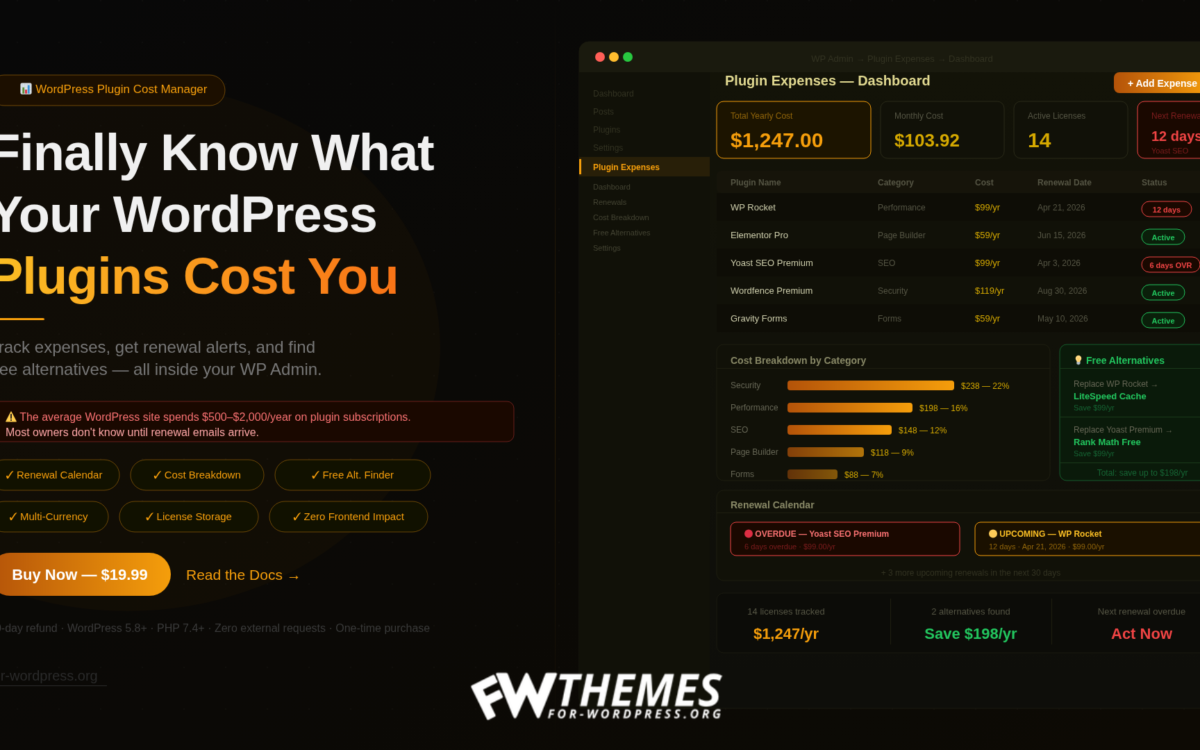
Plugin Expense Tracker is a WordPress plugin that adds a dedicated cost
management dashboard to your WP Admin. You add your plugin expenses once,
and it handles the tracking from there.
The dashboard shows four things immediately:
Total yearly cost — all your plugin expenses normalized to an annual
figure, no matter whether they bill monthly, quarterly, or yearly.
Renewal calendar — a color-coded view of upcoming and overdue renewals.
Red for overdue. Yellow for renewals in the next 30 days. No more surprises.
Cost breakdown by category — a horizontal bar chart showing where your
money goes. SEO? Security? Page builders? The chart makes it obvious.
Free alternative suggestions — this is where it gets interesting.
The Free Alternative Finder
This is the feature that separates Plugin Expense Tracker from a simple
spreadsheet.
The plugin includes a built-in database of 16 free alternatives to the
most popular premium WordPress plugins. It automatically matches your
tracked expenses against this database and shows you what you could replace
— and how much you would save.
A few examples from the built-in database:
- Replace WP Rocket → LiteSpeed Cache (free) → save $99/year
- Replace Yoast SEO Premium → Rank Math Free → save $99/year
- Replace Gravity Forms → WPForms Lite → save $59/year
- Replace BackupBuddy → UpdraftPlus Free → save $80/year
Switching is not always the right move — some premium plugins genuinely
justify their cost. But knowing the option exists, with the potential
savings spelled out, puts you in a better position to decide.
Who This Is For
Plugin Expense Tracker is useful in two different situations.
Solo site owners who want to understand and control what their site
actually costs. If you have been running WordPress for a few years, you
have accumulated plugins. This gives you a clear picture for the first time.
Freelancers and agencies managing client sites. Knowing what each client
site costs in plugins — and flagging overdue renewals before clients ask —
is part of professional site management. This makes it systematic instead
of ad hoc.
A Note on Free Alternatives
The plugin suggests alternatives, but it does not make decisions for you.
Some premium plugins are worth every dollar. Others have free equivalents
that cover 95% of the use case.
The goal is awareness, not cost-cutting for its own sake. If you are paying
$99/year for WP Rocket and your site genuinely loads faster because of it —
keep it. But if you installed a plugin two years ago and it auto-renewed three
times without you noticing — that is worth knowing.
The Bottom Line
WordPress plugin costs are real, cumulative, and easy to lose track of.
A simple tracking system — even a spreadsheet — is better than nothing.
Plugin Expense Tracker builds that system into your WP Admin, with renewal
alerts and alternative suggestions that a spreadsheet cannot provide.
One-time purchase. No monthly fees. No external services.